In our last article on data governance for marketing, we talked about why, despite all the wonderful reporting tools available, the numbers don’t match. They don’t line up cleanly, no matter how many tools and dashboards you purchase, download, and set up. The next question is: what actually helps you get clarity when they don’t?
The answer usually isn’t more data, at least not on its own. It’s learning how to use the data you already have with more structure, more context, and clearer roles for each source.
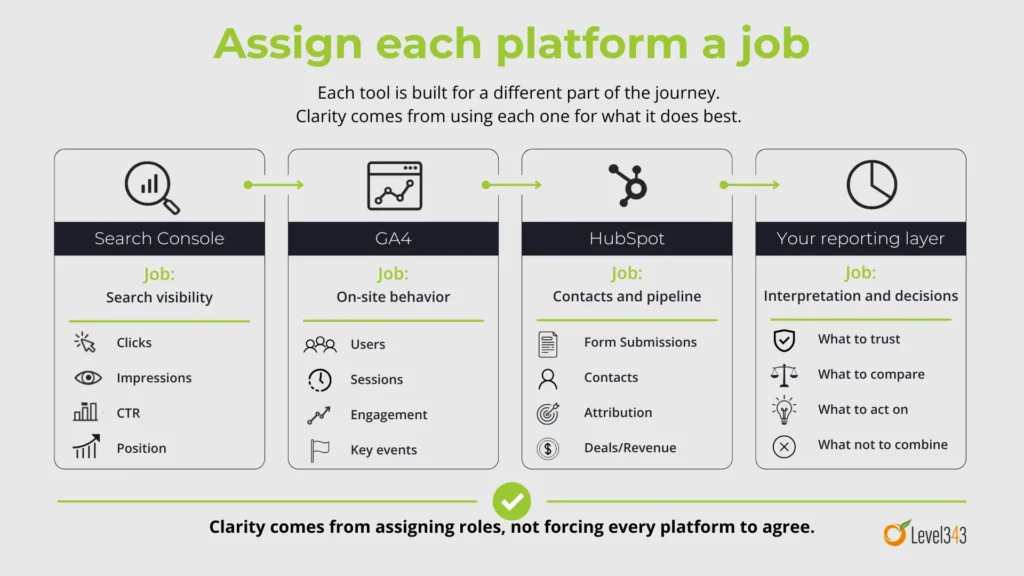
As we briefly touched on in What to trust when the numbers don’t match, each reporting tool has its own focus. Search Console is built around search performance. GA4 is built around on-site behavior. HubSpot (or your CRM) can extend into forms, contacts, attribution, deals, and revenue. Each brings another layer of data. Those views are all connected, but they’re not interchangeable.
We made the case that mismatched numbers don’t automatically mean bad data. So, what’s the next step?
If you’re already measuring different parts of the buyer journey, clarity comes from defining what each source is there to answer. That’s where data governance becomes useful for marketing and SEO, and that’s where this article picks up.
Table of contents
- When the answer feels unclear, the instinct is to add more data
- Measurements can sound similar while meaning very different things
- Is your dashboard providing more insight or organizing confusion?
- The real issue is signal vs noise
- Create insights with coherence, not expansion
- A simple way to tell whether your data is helping you or just keeping you busy
- This is the same mistake you can make with content
- What to do next before you add another tool
- Where this leads
When the answer feels unclear, the instinct is to add more data
When you’re trying to make sense of performance and every platform seems to tell a slightly different story, it’s common to bring in more data. You add another report. Add another connector or dashboard. You pull in another view.
It feels like progress because you’re adding information. More information should mean more clarity, right?
Not necessarily. Clarity usually comes from knowing which number to trust when you’re deciding what to report, what to optimize, or where to put budget. In other words, more data won’t help if you still can’t tell whether organic search is actually helping your pipeline or just inflating activity reports.
That’s why missing data isn’t the issue in many cases. It’s unresolved meaning between the data sources you already use. Different tools measure different things at different points in the journey, which is one reason discrepancies happen in the first place.
But clear measurement roles provide better insight than more dashboards
Once you know your platforms are built differently, the goal changes. You’re free to stop trying to force every source into agreement, which means you can start assigning clearer roles. You can stop arguing over numbers and start making cleaner calls about your campaign’s performance or the next marketing strategy.
If GA4 and Search Console already disagree by design, adding more platform data, call tracking, or third-party estimates can muddy the waters. Those sources won’t automatically reveal a single perfect number hiding beneath them all. More often, they give you additional views of the same customer journey. Those views can all be valid while still being different, and they aren’t always presented in a way that makes that easy to understand.
This matters because data governance for marketing isn’t really about collecting everything. Just like the way to build topical authority isn’t necessarily more content, the way to get clearer data isn’t necessarily more data.
Instead, reporting gets clearer when you decide which platform answers which question. When you do that, the disagreement becomes easier to interpret. You know which source you trust for search visibility, for on-site behavior, for form activity, and for downstream business outcomes.
Data governance in action
Write down the main question you ask of each platform. For example, let Search Console answer search visibility questions. Let GA4 answer behavior questions. Let HubSpot answer contact, attribution, and pipeline questions. If a source doesn’t have a defined role, give it one or demote it to supporting context.
Measurements can sound similar while meaning very different things
This is where clarity starts to improve quickly. A lot of reporting friction comes from using familiar words as if they mean the same thing everywhere. They don’t. And once you slow down long enough to define the type of data, the numbers stop feeling quite so slippery.
Let’s look at some of the most often interchanged terminologies that aren’t interchangeable at all.
A click isn’t a session
In Search Console, a click is the number of times someone clicked your site from Google Search results. An impression is when your site appears in search results for a user. Those are search-result metrics. They tell you what happened before the visit became on-site behavior.
In Google Analytics, a session is a period of time during which a user interacts with your site or app. That makes sessions behavior metrics, not search-result metrics.
So when Search Console clicks and GA4 sessions don’t line up, that doesn’t automatically mean something’s broken. They’re measuring different things at different points along the journey. Learn how to measure site traffic effectively.
Data governance in action
Decide now where search visibility lives in your reporting. If you want to know how often your target market saw you and clicked through from search results, use Search Console. If you want to know what happened once they landed on the site, use GA4. Don’t use the terms interchangeably in your own notes or reports.
A user isn’t a session either
Google Analytics also separates users from sessions.
A user metric in GA4 is about people. A session metric is about visits. One person can generate multiple sessions over time, which means the two numbers can move differently depending on behavior. Google’s GA4 documentation explicitly distinguishes user metrics from sessions for this reason.
That distinction matters because it changes what you think is improving. If sessions rise faster than users, you may be seeing more repeat visits. If users rise more than sessions, that suggests something different. Both can be useful. They just aren’t synonyms.
Data governance in action
Add a plain-language definition beside both “users” and “sessions” anywhere you report on traffic. If you say “traffic is up,” force yourself to finish the sentence: do you mean users, sessions, or search clicks?
A form submission isn’t always the same thing as a contact
This one causes a lot of confusion because the language feels so close. But active data governance from a marketing context requires precision.
HubSpot’s form analytics track things like views, submissions, and conversion rates for forms. A submission is a form being submitted. A contact is a person record in the CRM. Those are related, but they’re not automatically the same thing. HubSpot documents form submissions separately from CRM contact records and attribution reporting.
That means “I got 40 form submissions” and “I created 40 contacts” are not necessarily identical statements.
A contact may already exist. The form may be submitted multiple times. Your setup may require certain fields for contact creation. Your CRM logic may add another layer on top of that. The result is that form activity and contact growth can be connected without matching one-for-one.
Data governance in action
Define these terms in your own reporting language: form submission, new contact, qualified lead, and sales opportunity. Then check whether you’ve been using any of them loosely. Cleaning up these four terms alone can remove a lot of reporting fog.
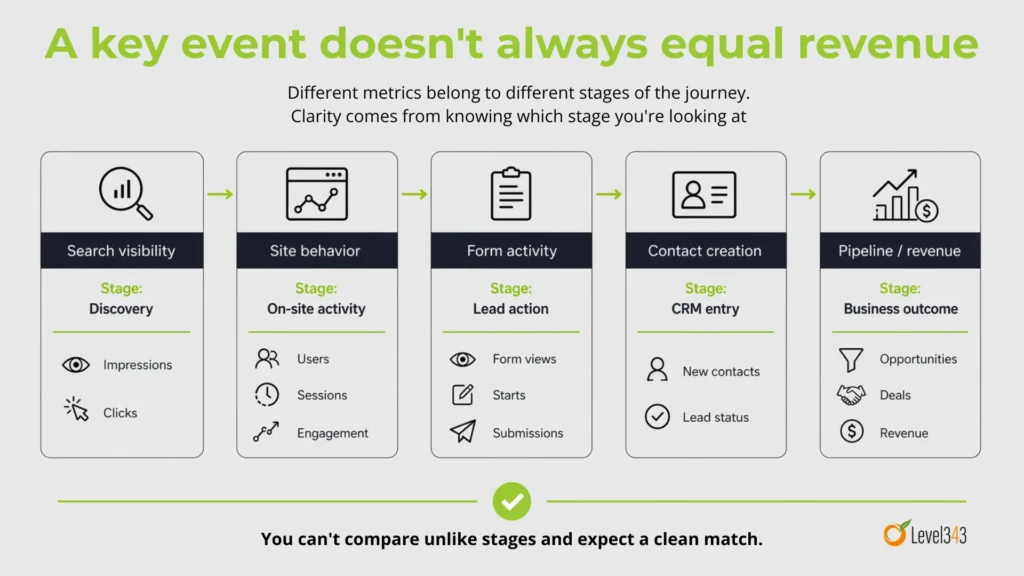
A key event doesn’t always equal revenue
GA4 uses key events to mark actions that are especially important to your business. That might be a form submission, a thank-you page visit, a call click, or another action you’ve decided matters. Google defines key events as the events most important to the success of your business.
HubSpot, on the other hand, can report on attribution for contacts, deals, and revenue. Those are later-stage business outcomes, not just on-site actions.
So a key event can be extremely useful without proving revenue on its own. It tells you that something meaningful happened on the site. Micro conversions are a good example.
Revenue tells you something happened farther down the line. Both matter, and knowing the difference is part of clearer marketing attribution. They just answer different questions.
Data governance in action
Map your funnel metrics by stage. Put search visibility first, on-site behavior second, form activity third, contact creation fourth, and pipeline or revenue after that. Once you see the stages laid out clearly, you’ll be much less tempted to compare unlike metrics as if they should reconcile neatly.
Is your dashboard providing more insight or organizing confusion?
Dashboards can be helpful. They can save time, centralize reporting, and make patterns easier to spot. But a marketing dashboard becomes much more useful when the meaning underneath it is already clear – one of the many reasons why data governance in this context is important.
If the metrics in it still carry conflicting definitions, or if two sources are being shown side by side without any explanation of what each one is actually measuring, the dashboard may be making your confusion easier to look at rather than easier to solve. That’s not a dashboard problem as much as a governance problem.
I’ve said this before, and I’ll keep repeating it, because it’s a very important distinction. Google’s documentation distinguishes Search Console data from Google Analytics behavior data, and HubSpot separates attribution reporting for contacts, deals, and revenue. The platforms themselves are telling you that different measurements answer different questions. A dashboard layer doesn’t erase those distinctions.
Data governance in action
Open your main dashboard and ask three questions for every metric on it: What does this mean? Where does it come from? What decision is it supposed to support?
If you can’t answer all three quickly, that metric needs a definition, a source note, or a better place in the report.
The real issue is signal vs noise
You can start to think the problem is missing data, when the real problem is often too many competing signals. The more metrics you watch at once, the easier it is for everything to look important. Search visibility is on the rise! Our engagement rates are shifting! We’re getting more / less form fills! More traffic is coming from this channel than that one now! Revenue is lagging! Each source has something to say, and each one can sound urgent.
This doesn’t mean the data is useless. It means you need a way to separate the signals that help you make the next decision from the signals that are just adding volume. And no, staring harder at the dashboard isn’t going to make the numbers sort themselves out.
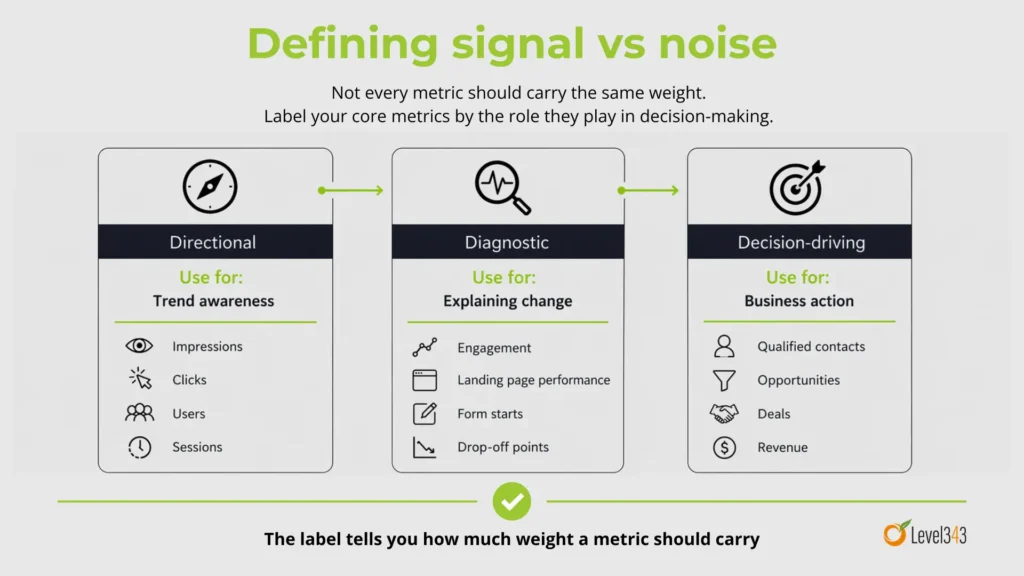
That’s where governance helps. It gives you a structure for deciding which numbers are directional, which numbers are diagnostic, and which ones are strong enough to anchor a business decision.
Data governance in action
Label your core metrics in one of three ways: directional, diagnostic, or decision-driving. Then look at your reports again. You may find that some of the numbers you’ve been closely monitoring were never meant to carry that much weight. Here, it’s important to understand which KPIs you should be watching.
Create insights with coherence, not expansion
If more data isn’t the thing that helps you most, then what does? Coherence. When the data, definitions, and sources fit together clearly, not when you just keep adding more stuff.
That means consistent definitions. Clear roles for each platform. Shared logic across the funnel. Enough context to understand what changed and why.
Better insight comes from a clearer structure around the data you already have. For marketing and SEO, that usually means deciding:
- Which platform owns which question
- What each core metric means
- How the funnel stages connect
- Which numbers are useful for optimization, and which ones are better for final business reporting
That clarity makes it easier to explain performance, defend decisions, and know what to do next.
A simple way to tell whether your data is helping you or just keeping you busy
You don’t need a huge governance process to spot the issue. Ask yourself:
- If two tools disagree, do I know why?
- If a metric moves, do I know what it’s actually measuring?
- If performance improves, can I trace that improvement through the funnel without changing definitions halfway through?
- If I say traffic, lead, or conversion, do I know exactly what I mean?
If the answer is no, it usually means you need clearer definitions, clearer roles, and a cleaner way to connect the signals you already have.
This is the same mistake you can make with content
This is one reason the topic connects so naturally to marketing and SEO. More content doesn’t create topical authority on its own. More pages without structure, internal support, and clear relationships create weaker signals than they should.
Data works the same way. More metrics don’t create understanding on their own. More reports without structure, definitions, and clear ownership create more room for misreading. In both cases, the path forward isn’t just more. It’s a better connection between the numbers you track and the (informed) decisions you need to make.
What to do next before you add another tool
Before you add another dashboard, another connector, or another reporting layer, start here instead.
Build a one-page measurement map for your marketing and SEO reporting. Include:
- the metric name
- the platform it comes from
- the official definition
- the question it answers
- what it shouldn’t be compared to directly
- whether it is directional, diagnostic, or decision-driving
Use the platform definitions as your starting point.
- Search Console defines clicks and impressions one way.
- GA4 defines sessions, users, and key events another way.
- HubSpot separates form submissions, attribution, contacts, deals, and revenue into still other layers.
Once you work from those actual distinctions, your reporting starts to become easier to interpret.
Where this leads
Once you stop assuming more data is what creates clarity, the next question gets more useful: What actually makes marketing and SEO data easier to trust?
That’s where our next article will take us. Into the layers that make measurement usable: collection, definition, context, interpretation, and decision rules.
Because if more data doesn’t create better insight, what does? Better structure around the data you already have.
If your reporting keeps giving you five versions of the truth, the problem may not be the data. It may be the system behind it. See how Level343 helps marketing teams turn disconnected signals into a clearer SEO and measurement strategy. Contact Level343 today.